Managed databases: RDS, DynamoDB, ElastiCache
Choose relational, key-value or cache storage, then verify backups, capacity and deletion settings.
By the end of this lesson you'll be able to
0 of 5 completeRDS: managed relational databases
RDS runs a relational engine while AWS manages much of the host, patching and infrastructure. You still own the schema, queries, indexes, connection limits, migrations and recovery decisions.
The lesson used PostgreSQL on a db.t4g.micro, 20 GiB gp3 storage, encryption, one Availability Zone and zero retained automated backups. It was deliberately small and temporary.
RDS storage
gp3 is a general-purpose SSD option. Provisioned IOPS storage is for workloads that need a more controlled I/O profile and can justify the cost. Allocated storage is not the same as free space inside the database; monitor both the RDS volume and the engine.
High availability and read scaling
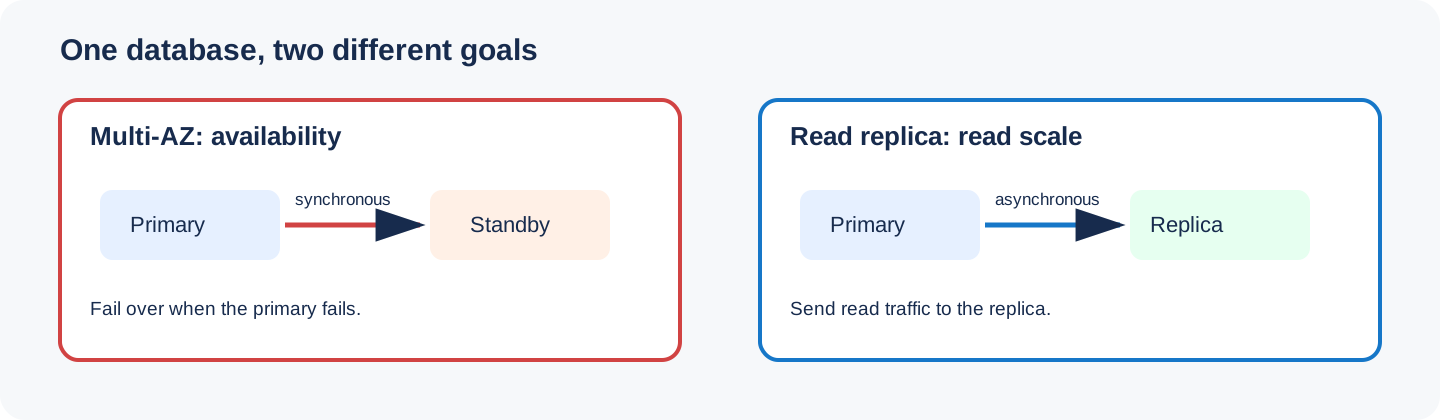
Multi-AZ keeps a standby for failover. It is a high-availability design, not a read-scaling design. Read replicas are separate readable instances that use replication and can serve read traffic. Both features add cost and operational decisions.
Backups and snapshots
Automated backups support point-in-time recovery within the retention window. A manual snapshot is a longer-lived recovery artifact. A final snapshot at deletion can be valuable in production but would leave storage behind in this exercise, so the mission explicitly skips it.
Parameter groups
Parameter groups hold engine settings. Change them deliberately, check whether a parameter is dynamic or requires a reboot, and test changes against the workload. A parameter group is not a replacement for migrations or query tuning.
Aurora
Aurora is an AWS relational engine compatible with MySQL and PostgreSQL APIs. Its distributed storage and cluster model can suit workloads that need those characteristics, but it is not a default upgrade for every RDS database. Start with availability, latency and recovery requirements.
DynamoDB
DynamoDB is a managed key-value and document database. Model access patterns first. The partition key distributes data; an optional sort key orders related items within a partition. A table does not provide arbitrary SQL joins, so design queries around the keys and indexes you will actually use.
The temporary table used on-demand capacity and one string partition key:
{
    "Name": "temporary-items",
    "Status": "ACTIVE",
    "ItemCount": 0,
    "Key": [{"AttributeName": "pk", "KeyType": "HASH"}]
}
DynamoDB capacity
On-demand capacity is useful for unpredictable traffic or early workloads where capacity planning is not settled. Provisioned capacity is useful when traffic is predictable and you can manage read and write capacity units. Review throttling, adaptive capacity and indexes before changing modes.
Streams record item changes for consumers. Point-in-time recovery and backups protect table data, but they do not fix a poor key design. DynamoDB Local is useful for development without making network calls to AWS.
ElastiCache
ElastiCache provides managed Redis/Valkey or Memcached deployments. A cache should be disposable: define misses, expiry and recovery. Never make the cache the only copy of important data. Redis/Valkey offers richer data structures and persistence choices; Memcached is a simpler distributed cache.
Availability, replicas and recovery
Multi-AZ and read replicas solve different problems. Multi-AZ synchronously maintains a standby for instance failover; the standby is not a read endpoint. A read replica is asynchronously replicated and can serve read traffic or be promoted. Use Multi-AZ for availability, replicas for read scale, and both when the workload needs both properties.
Automated backups support point-in-time restore within the retention window. A manual snapshot is an explicit recovery
artifact. In production, set retention and test a restore; in this exercise, deletion uses --skip-final-snapshot
because leaving a snapshot behind would leave a billable resource.
Maintenance, upgrades and connection management
Maintenance windows make patch and engine-upgrade work predictable. Test a major engine upgrade separately, check extension compatibility, and keep a rollback or restore plan. Parameter groups hold engine settings; a parameter can be dynamic or require a reboot.
RDS Proxy pools and reuses database connections. It is useful when many short-lived functions would otherwise exhaust the database connection limit. It does not replace query tuning or a sensible pool size.
IAM database authentication replaces a long-lived password with a short-lived authentication token for supported engines. Secrets Manager is a better fit for a credential that must be rotated and retrieved by an application. Use the smallest role and database grants possible.
Aurora and caching
Aurora uses a cluster with a writer endpoint and reader endpoint rather than treating every database as one isolated instance. Aurora Serverless v2 scales capacity in fine-grained increments while the cluster remains available to the application. Choose it when the workload needs Aurora's storage and cluster behavior; it is not automatically cheaper.
ElastiCache Redis or Valkey is for data that can be rebuilt or has an explicit source of truth. Cache-aside is the usual pattern: read the cache, load from the database on a miss, then set an expiry. Define invalidation and stale-data behavior before adding a cache. DAX is a DynamoDB-specific in-memory cache for read-heavy workloads; it changes the client path and should be justified with measured latency and cost.
DynamoDB keys, indexes and correctness
The partition key distributes items. A composite primary key adds a sort key, which lets one partition contain an ordered collection of related items. A GSI can use a different partition and sort-key design and is eventually consistent by default. An LSI shares the table partition key and must be declared when the table is created.
Use Query when the access pattern supplies a partition key; use Scan only for bounded maintenance or discovery
work. Conditional writes prevent lost updates. TTL removes expired items asynchronously. Streams publish item changes
for downstream consumers, and transactions make a small set of writes commit together.
On-demand capacity is a good default while traffic is uncertain. Provisioned capacity is useful when request rates are predictable and you can manage capacity units. Both modes still need throttling metrics and a key design that avoids hot partitions.
One relational database and one key-value table
Create a small encrypted private PostgreSQL RDS instance and an on-demand DynamoDB table, inspect their settings, then delete both without retaining a final RDS snapshot.
Verified RDS and DynamoDB settings followed by a clean accountReveal one safe solution
$ export AWS_REGION=ap-south-1
$ export DB_ID="academy-postgres-$RANDOM"
$ export TABLE="academy-items-$RANDOM"
$ export DB_PASSWORD="Use-a-temporary-secret-here"
$ aws rds create-db-instance --region "$AWS_REGION" --db-instance-identifier "$DB_ID" \
    --db-instance-class db.t4g.micro --engine postgres --allocated-storage 20 \
    --storage-type gp3 --master-username academy --master-user-password "$DB_PASSWORD" \
    --db-subnet-group-name default --backup-retention-period 0 --no-multi-az \
    --no-publicly-accessible --storage-encrypted --no-deletion-protection
$ aws dynamodb create-table --region "$AWS_REGION" --table-name "$TABLE" \
    --attribute-definitions AttributeName=pk,AttributeType=S AttributeName=gsi,AttributeType=S \
    --key-schema AttributeName=pk,KeyType=HASH \
    --global-secondary-indexes 'IndexName=GSI1,KeySchema=[{AttributeName=gsi,KeyType=HASH}],Projection={ProjectionType=ALL}' \
    --billing-mode PAY_PER_REQUEST
$ aws dynamodb wait table-exists --region "$AWS_REGION" --table-name "$TABLE"
$ aws dynamodb put-item --region "$AWS_REGION" --table-name "$TABLE" --item '{"pk":{"S":"lesson-10"},"gsi":{"S":"database"},"value":{"N":"10"}}'
$ aws dynamodb query --region "$AWS_REGION" --table-name "$TABLE" --index-name GSI1 \
    --key-condition-expression 'gsi = :g' --expression-attribute-values '{":g":{"S":"database"}}' \
    --query 'Items' --output json
[
    {"pk":{"S":"lesson-10"},"gsi":{"S":"database"},"value":{"N":"10"}}
]
$ aws dynamodb scan --region "$AWS_REGION" --table-name "$TABLE" --query 'Items' --output json
[
    {"pk":{"S":"lesson-10"},"gsi":{"S":"database"},"value":{"N":"10"}}
]
$ aws dynamodb describe-table --region "$AWS_REGION" --table-name "$TABLE" \
    --query 'Table.{Name:TableName,Status:TableStatus,Keys:KeySchema}' --output table
---------------------------------------------
|              DescribeTable                 |
+---------+--------+-------------------------+
| Name    | Status | Keys                    |
+---------+--------+-------------------------+
| TABLE   | ACTIVE | pk / HASH               |
+---------+--------+-------------------------+
$ aws rds describe-db-instances --region "$AWS_REGION" --db-instance-identifier "$DB_ID" \
    --query 'DBInstances[0].{Status:DBInstanceStatus,Class:DBInstanceClass,Storage:AllocatedStorage,MultiAZ:MultiAZ,Backups:BackupRetentionPeriod,Encrypted:StorageEncrypted,Public:PubliclyAccessible}' --output table
$ aws rds delete-db-instance --region "$AWS_REGION" --db-instance-identifier "$DB_ID" \
    --skip-final-snapshot --delete-automated-backups
$ aws dynamodb delete-table --region "$AWS_REGION" --table-name "$TABLE"
$ aws dynamodb describe-table --region "$AWS_REGION" --table-name "$TABLE"
An error occurred (ResourceNotFoundException) when calling the DescribeTable operation
$ aws rds wait db-instance-deleted --region "$AWS_REGION" --db-instance-identifier "$DB_ID"
$ aws rds describe-db-instances --region "$AWS_REGION" --db-instance-identifier "$DB_ID"
An error occurred (DBInstanceNotFound) when calling the DescribeDBInstances operation
aws rds create-db-instance --region "$AWS_REGION" --db-instance-identifier "$DB_ID" \awsthe AWS command line--regionwhich Region
aws dynamodb scan --region "$AWS_REGION" --table-name "$TABLE" --query 'Items' --output json--querypick fields from the JSON response--outputoutput format
Use a secret manager or an interactive secret prompt for a real password. The placeholder above is only a shape; never paste a production password into shell history.
Try it yourself
0 of 5 steps doneRun each task in your own account or terminal, then tick it off.
Quick check
When is RDS a good fit?
Official reading for this lesson
Or get every quiz answer right and it completes itself.